
MY ROLE
Product Designer — owned the feature end-to-end, from problem discovery and candidate interviews to solution design, prototyping, and usability testing across the AI interview experience.
THE TEAM
Product Designer - Me
Product Engineers
SKILLS
Usability Testing
Interaction Design
Behavioural Design
Experience Strategy
TIMELINE
1 month
Project overview
The Interview Agent is a key pillar of the Geektrust AI Hiring Ecosystem, designed to revolutionise how technical interviews are conducted for software developers. It enables live code pairing sessions where candidates interact with a human-guided AI, replicating the feel of a real interviewer.
Project outcome
INTENDED SUCCESS METRICS
OKAY, BUT WHAT IS GEEKTRUST'S AI INTERVIEW?
This project reimagines time awareness across Geektrust’s AI interview experience. It helps candidates understand the time remaining, pace themselves across interview, and prepare for transitions, creating a calmer, clearer, and more predictable interview journey.
Projected towards higher interview completion rates, fewer time-related dropoffs, improved on-time stage completion, and stronger candidate-reported clarity and confidence around pacing.
DESIGNING THE EXPERIENCE
Timer alerts & nudges
Final designs


Note: The entire interview experience was revamped, from its overall flow and interactions to the final UI.
Before we dive into the features lets look at how the experience look today.
QnA Stage
Coding stage - Approach
Coding stage - Writing code

Buffer time alert - 1.5 mins given at the end of each stage and end of the interview.

A countdown timer from 1:30 secs is presented. Default state color stays amber - depicts warning.
Warning state - timer turns red at the last 30 secs.

Nudge - Sent when candidate doesn't respond for the first 20secs , prompting them to begin.
Extension timer alert - Appears at the end of an interview only when additional time has been specifically requested by client + remaining from last stage if any.

Header for time and stage awareness

Take a look at how the alerts are presented today.

Explicitly calling out which stage user is in, severing as current status
Dropdown to show upcoming stages

Stage countdown - placed in the dropdown to meet platform requirements while preserving the feel of a timer-free human interview.
Global interview timer provided explicitly

Global timer states

Dropdown - Coding stage with substages
Current stage status for coding round with it substages - Approach, Writing code, Followup
-- Neutral state; used throughout the interview.
-- 1min left; used in the last stage when 1min left in the interview.
-- 30secs left; used in the last stage when 30secs min left in the interview.
-- 00:00 secs left; used in the last stage when interview is over. The text ‘left in the interview’ goes aways.
-- 00:00 secs left; used in the beginning before starting the interview & if extension timer is applicable - 00:00 hits when the interview time is up.
-- elapsed time; given when the interview ends and time runs in the negative till candidate responds before extension timer is put in place.
-- extension time; given at the end of interview.
For more details on the timer alerts and nudge, refer to the supporting documentation I have prepared - Alerts + Nudges + Tips - Interface Functions, Interactions & Microcopy 👈 Click to read document
Let’s begin with the final experience, shaped through multiple rounds of exploration, feedback, and iteration which brings together clearer stage visibility, time awareness, pacing nudges, and smoother transitions across the interview journey.
But before I begin, have a look at this demo video of the existing product to understand it better.
I started with conducting usability sessions with candidates taking the existing AI interview. Observing how they interpreted time cues, paced their answers, navigated stages, and responded to alerts helped me audit the current experience and identify moments of confusion, stress, and unexpected transitions.
User testing to uncover the gaps
DIVING DEEP

Glimpse of the User Test board
PROBLEM STATEMENT
Candidates struggle to understand how much time remains, what stages lie ahead, and how to pace their answers during AI interviews. The elapsed-time display, hidden stages, lack of question-level guidance, and easily missed alerts often leave them unprepared for transitions or sudden cutoffs. This creates unnecessary stress, poor pacing, and uneven performance.
Once I had gathered and synthesised enough candidate feedback, I translated the recurring pain points into a clear problem statement and framed the right “How Might We” questions to guide the solution.
Show the remaining interview time without creating panic and communicate with clarity?
Guide candidates to move forward without making them feel rushed?
Keep stage allocation and remaining time visible without overwhelming candidates?
Reveal the complete interview journey, including every stage and its duration?
Design reminders that are difficult to miss without disrupting focus or creating stress?
Prepare candidates for upcoming stages and reduce unexpected transitions?
THE GOAL WAS TO
Replicate the natural pacing and guidance of a real-life human interview through clear, low-stress time cues that help candidates pace themselves, anticipate transitions, and interview with confidence resulting in a seamless interview experience.
How might we…

The experience was shaped around two interconnected areas:
• Helping candidates understand their current stage and stage history, and
• Guiding their pacing through timer alerts and nudges.
Defining how these alerts and nudges should behave across different remaining-time intervals was the most complex part, and this section breaks down the logic behind those decisions.
Shaping of timer alerts and nudges
DEFINING THE DIRECTION
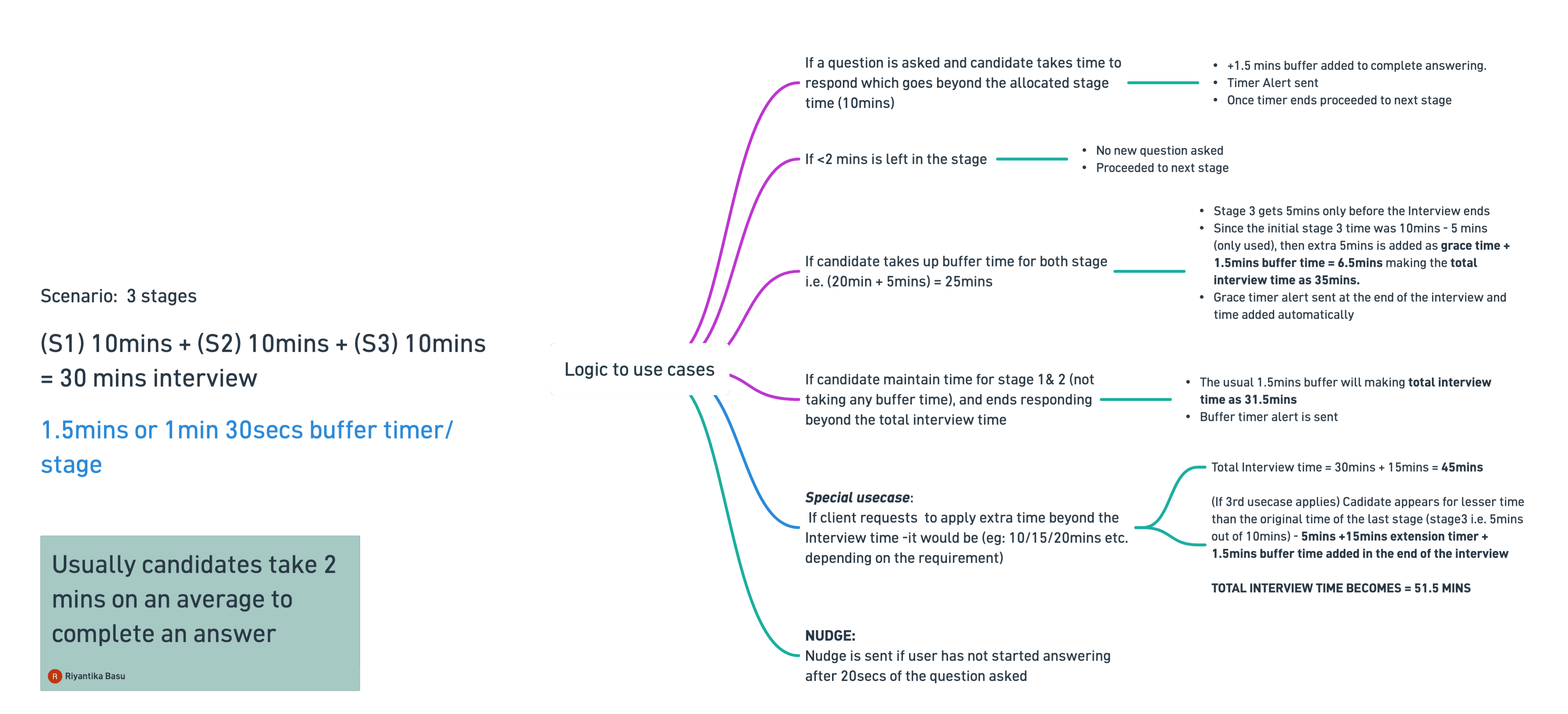
While iterating, I came up with the concept of buffer time, an additional 1.5 minute grace period at the end of each stage. If a candidate is still responding when the allocated time ends, they can use this window to finish their answer before the interview automatically moves them to the next stage.
The Logic in place
Iterating towards clarity


The solution went through several iterations, with each direction revealing a new edge case or interaction gap. I continued refining the experience until the final design brought the different pieces together cohesively.
To sum up,
This redesign turns time from a source of pressure into a quiet layer of guidance. By bringing human-like pacing and timely cues into the AI interview, it allows candidates to focus on what truly matters that is their responses, not the clock.
This redesign turns time from a source of pressure into a quiet layer of guidance. By bringing human-like pacing and timely cues into the AI interview, it allows candidates to focus on what truly matters that is their responses, not the clock.

MY ROLE
Product Designer — owned the feature end-to-end, from problem discovery and candidate interviews to solution design, prototyping, and usability testing across the AI interview experience.
Product Designer — owned the feature end-to-end, from problem discovery and candidate interviews to solution design, prototyping, and usability testing across the AI interview experience.
THE TEAM
Product Designer - Me
Product Engineers
SKILLS
Usability Testing
Interaction Design
Behavioural Design
Experience Strategy
TIMELINE
1 month
Product Designer — owned the feature end-to-end, from problem discovery and candidate interviews to solution design, prototyping, and usability testing across the AI interview experience.
Project overview
This project reimagines time awareness across Geektrust’s AI interview experience. It helps candidates understand the time remaining, pace themselves across interview, and prepare for transitions, creating a calmer, clearer, and more predictable interview journey.
OKAY, BUT WHAT IS GEEKTRUST'S AI INTERVIEW?
The Interview Agent is a key pillar of the Geektrust AI Hiring Ecosystem, designed to revolutionise how technical interviews are conducted for software developers. It enables live code pairing sessions where candidates interact with a human-guided AI, replicating the feel of a real interviewer.
Project outcome
Projected towards higher interview completion rates, fewer time-related dropoffs, improved on-time stage completion, and stronger candidate-reported clarity and confidence around pacing.
INTENDED SUCCESS METRICS
Candidates struggle to understand how much time remains, what stages lie ahead, and how to pace their answers during AI interviews. The elapsed-time display, hidden stages, lack of question-level guidance, and easily missed alerts often leave them unprepared for transitions or sudden cutoffs. This creates unnecessary stress, poor pacing, and uneven performance.
PROBLEM STATEMENT
Project overview
This project reimagines time awareness across Geektrust’s AI interview experience. It helps candidates understand the time remaining, pace themselves across interview, and prepare for transitions, creating a calmer, clearer, and more predictable interview journey.
But before I begin, have a look at this demo video of the existing product to understand it better.
User testing to uncover the gaps
I started with conducting usability sessions with candidates taking the existing AI interview. Observing how they interpreted time cues, paced their answers, navigated stages, and responded to alerts helped me audit the current experience and identify moments of confusion, stress, and unexpected transitions.
DIVING DEEP
Once I had gathered and synthesised enough candidate feedback, I translated the recurring pain points into a clear problem statement and framed the right “How Might We” questions to guide the solution.
Show the remaining interview time without creating panic and communicate with clarity?
Guide candidates to move forward without making them feel rushed?
Keep stage allocation and remaining time visible without overwhelming candidates?
Reveal the complete interview journey, including every stage and its duration?
Design reminders that are difficult to miss without disrupting focus or creating stress?
Prepare candidates for upcoming stages and reduce unexpected transitions?
THE GOAL WAS TO
Replicate the natural pacing and guidance of a real-life human interview through clear, low-stress time cues that help candidates pace themselves, anticipate transitions, and interview with confidence resulting in a seamless interview experience.
How might we…
The experience was shaped around two interconnected areas:
• Helping candidates understand their current stage and stage history, and
• Guiding their pacing through timer alerts and nudges.
Defining how these alerts and nudges should behave across different remaining-time intervals was the most complex part, and this section breaks down the logic behind those decisions.
DEFINING THE DIRECTION
The Logic in place
While iterating, I came up with the concept of buffer time, an additional 1.5 minute grace period at the end of each stage. If a candidate is still responding when the allocated time ends, they can use this window to finish their answer before the interview automatically moves them to the next stage.
Shaping of timer alerts and nudges
QnA Stage
Buffer time alert - 1.5 mins given at the end of each stage and end of the interview.
A countdown timer from 1:30 secs is presented. Default state color stays amber - depicts warning.
Nudge - Sent when candidate doesn't respond for the first 20secs , prompting them to begin.
Extension timer alert - Appears at the end of an interview only when additional time has been specifically requested by client + remaining from last stage if any.
Take a look at how the alerts are presented today.
Explicitly calling out which stage user is in, severing as current status
Dropdown to show upcoming stages
Stage countdown - placed in the dropdown to meet platform requirements while preserving the feel of a timer-free human interview.
Global timer states
Dropdown - Coding stage with substages
-- Neutral state; used throughout the interview.
-- 1min left; used in the last stage when 1min left in the interview.
-- 30secs left; used in the last stage when 30secs min left in the interview.
-- 00:00 secs left; used in the last stage when interview is over. The text ‘left in the interview’ goes aways.
-- 00:00 secs left; used in the beginning before starting the interview & if extension timer is applicable - 00:00 hits when the interview time is up.
-- elapsed time; given when the interview ends and time runs in the negative till candidate responds before extension timer is put in place.
-- extension time; given at the end of interview.
Current stage status for coding round with it substages - Approach, Writing code, Followup
For more details on the timer alerts and nudge, refer to the supporting documentation I have prepared - Time Awareness 👈 Click to read document
DESIGNING THE EXPERIENCE
Final designs
Let’s begin with the final experience, shaped through multiple rounds of exploration, feedback, and iteration which brings together clearer stage visibility, time awareness, pacing nudges, and smoother transitions across the interview journey.
Note: The entire interview experience was revamped, from its overall flow and interactions to the final UI.
Before we dive into the features lets look at how the experience look today.
Coding stage - Approach
Coding stage - Writing code
Timer alerts & nudges
Global interview timer provided explicitly
Header for time and stage awareness
Warning state - timer turns red at the last 30 secs.
Iterating towards clarity


The solution went through several iterations, with each direction revealing a new edge case or interaction gap. I continued refining the experience until the final design brought the different pieces together cohesively.

Reimagining time awareness in AI Interviews
Reimagining time awareness in AI Interviews
View other projects
View other projects


riyantika basu.
Let's talk design.
riyantikabasu@gmail.com
Crafted with love 🤍
© 2026
riyantika basu.
Let's talk design.
riyantikabasu@gmail.com
Crafted with love 🤍
© 2026
