
MY ROLE
As a UX Designer, I helped shape the product foundation by designing core workflows across web and mobile.
THE TEAM
UX Designer - me
Product Engineers
SKILLS
Product Strategy
UX Design
UI Design
Design Systems
TIMELINE
5 Months
Project overview
GyanGrove is an EduTech company focused on transforming K–12 education through innovative solutions and AI. It offers user-friendly software that helps schools improve operational efficiency, streamline communication, and make learning more engaging through gamified experiences.
HOWEVER, I HAD A CORE CONSTRAINT
Limited user research
Since direct user interaction was not feasible, I had to rely on existing research data.
Project outcome
As the product was still at the MVP stage, these were defined as intended measures of success rather than achieved outcomes.
Improve repeat usage, reduce dependency on scattered tools, fewer scheduling and data-entry errors, quicker access to essential school information across user groups.
INTENDED SUCCESS METRICS
// They operate through two sides of the same ecosystem.
A mobile app for students, parents, and teachers to access everyday school updates.
A web platform for school admins
In this project, I worked on shaping the MVP experience of the product features across admin and consumer-facing platforms.
People behind the platform

Admin of schools



Teahcers
Parents
Students
WEBSITE USER
APP USERS
PROBLEM STATEMENT
Today schools often manage operations like academics, fees, staff, students, transport, communication, etc. through scattered tools, manual processes, and disconnected records. GyanGrove aimed to bring these everyday school operations into one simple digital space for admins, teachers, students, and parents.
Over the course of
5 months,
I did…
Roadmap for the design
Wireframes and design system
UI design and prototypes
Technical inputs
Defining new user flows and driving decisions.
Exploring iterations and creating wireframes to navigate the direction of a better experience.
Crafting the interface layout and prototyping mobile and web screens based on wireframes.
Close collaboration with the frontend and the backend team to better understand development feasibility.


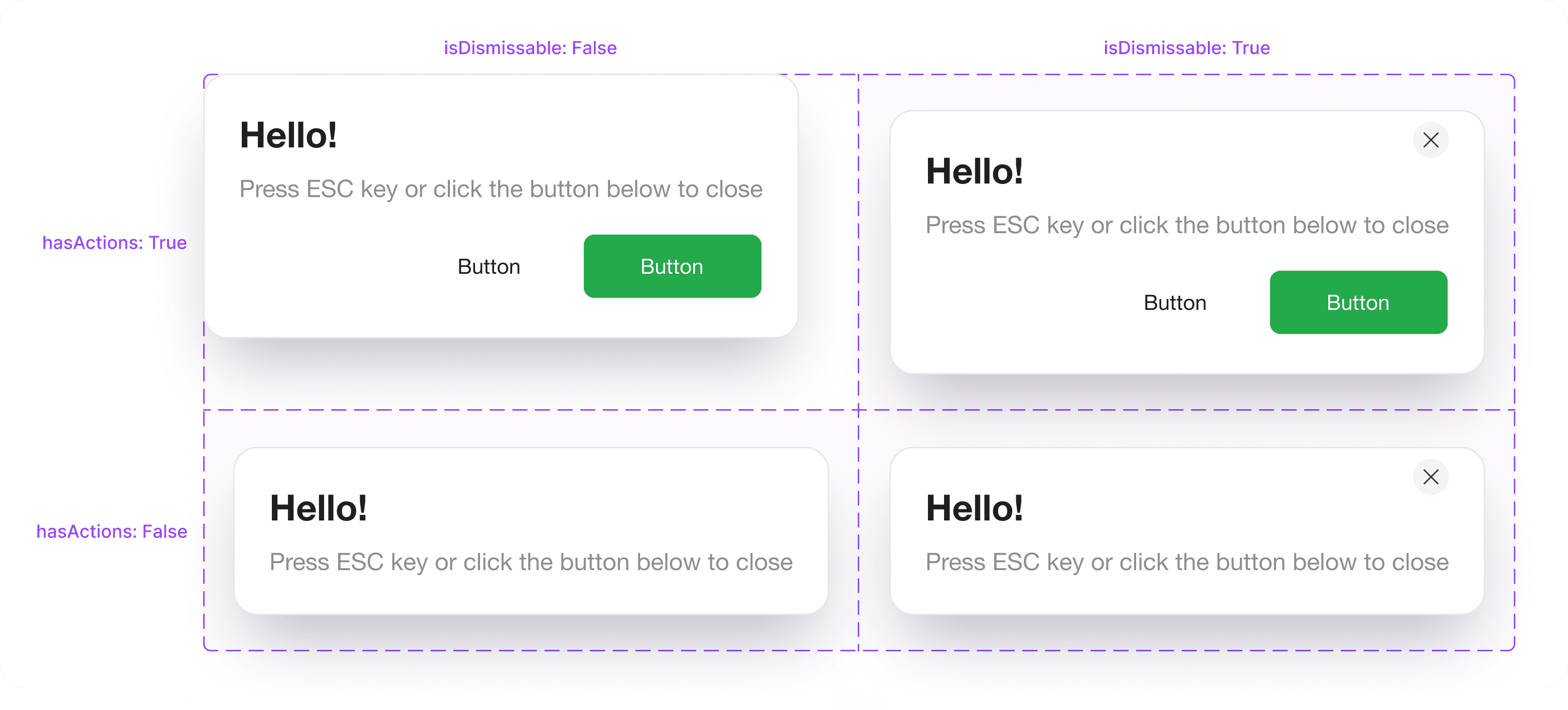
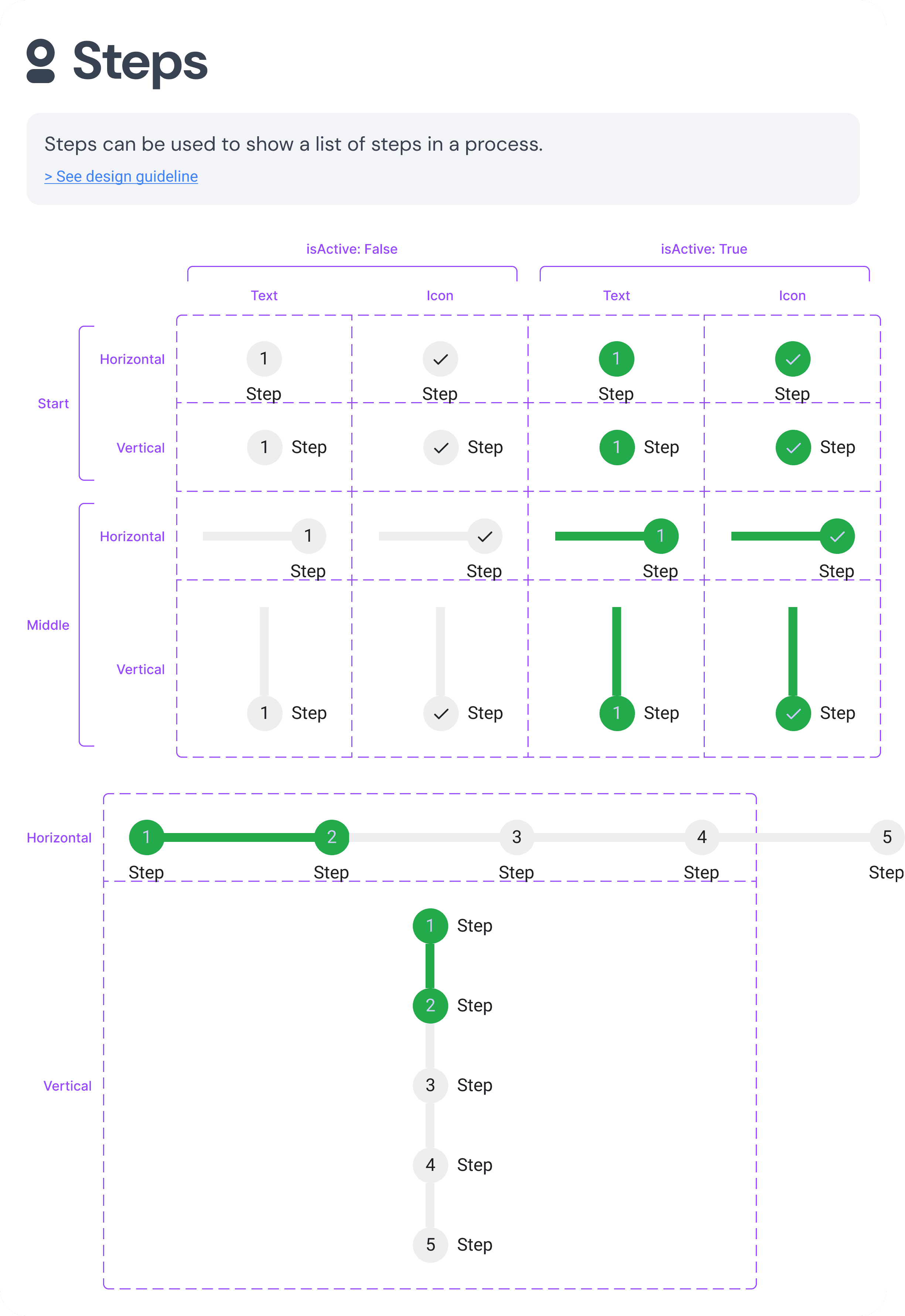


Designed and added a couple of components to the design system to be used throughout the product ecosystem.
// KEY MODULES

Crafting an end-to-end School Management Platform
Crafting an end-to-end School Management Platform
MY ROLE
As a UX Designer, I helped shape the product foundation by designing core workflows across web and mobile.
THE TEAM
Product Designer - Me
Product Engineers
SKILLS
Usability Testing
Interaction Design
Behavioural Design
Experience Strategy
TIMELINE
1 month
Project outcome
INTENDED SUCCESS METRICS
The solution aims to improve interview completion, reduce time-related drop-offs and complaints, and help candidates feel more informed and in control of their pacing.
Today schools often manage operations like academics, fees, staff, students, transport, communication, etc. through scattered tools, manual processes, and disconnected records. GyanGrove aimed to bring these everyday school operations into one simple digital space for admins, teachers, students, and parents.
PROBLEM STATEMENT
Project overview
GyanGrove is an EduTech company focused on transforming K–12 education through innovative solutions and AI. It offers user-friendly software that helps schools improve operational efficiency, streamline communication, and make learning more engaging through gamified experiences.
// They operate through two sides of the same ecosystem.
A web platform for
school admins
A mobile app for students, parents, and teachers to access everyday school updates.
In this project, I worked on shaping the MVP experience of the product features across admin and consumer-facing platforms.
HOWEVER, I HAD A CORE CONSTRAINT
Limited user research
Since direct user interaction was not feasible, I had to rely on existing research data.
People behind the platform
Admin of schools
Teahcers
Parents
Students
WEBSITE USER
APP USERS
Over the course
of 5 months,
I did…
UI design and prototypes
Crafting the interface layout and prototyping mobile and web screens based on wireframes.
Technical inputs
Close collaboration with the frontend and the backend team to better understand development feasibility.
Roadmap for the design
Defining new user flows and driving decisions.
Wireframes and design system
Exploring iterations and creating wireframes to navigate the direction of a better experience.
Designed and added a couple of components to the design system to be used throughout the product ecosystem.
Web - based
Mobile - based


Read case study

Fast, flexible Timetable assignment
Create reusable timetable with custom periods, timings, breaks, and class schedules. Assign templates to classes, add subjects and teachers, preview, and publish.
DIVING DEEP
Questioning what would users want
Before getting into the screens, it was important to first map out the purpose of this feature and lead with that direction.
THE GOAL WAS TO
Help admins create, assign, and publish class-wise timetables without manually setting up every schedule from scratch.
From goal to a
step-by-step flow
After defining the goal, the next step was to break the feature down into a clear flow to understand how the timetable would move from setup to completion. This helped structure the experience before designing screens, from creating a reusable template to assigning it, filling in subjects and teachers, previewing the timetable, and publishing the final schedule.
Timetable template
creation
To assign a timetable, the first step is to create a reusable template. Admins start by adding basic details such as template name, description, number of periods, start time, and period duration.
Key screens


Based on these inputs, a sample timetable is generated with the first day, period-wise column, timings, and available actions for editing the template.

Template assignment
table
A table created in the backend, having all classes with its respective sections and a column to assign the templates that were previously created.
Class-wise timetable
Once assigned, the timetable applies across all class sections while still allowing edits. Admins can switch sections, add subjects, create custom periods, assign teachers, adjust timings, and preview before publishing.

This is a preview of how the timetable would look like.

Impactful design
decisions I made
Kept a flexible workflow from template setup to final assignment, allowing changes to periods, timings, subjects, teachers, and custom activities.
Prevented errors before publishing by flagging conflicts like teacher double-booking and adding a final preview step.
Reduced repetitive work by allowing admins to reuse one timetable template across multiple classes and sections.
Made navigation easier by letting admins switch between sections within the same timetable view.
Now watch
the feature
in action!

Configurable Fee
Management system
A finance management module design that enables admins to define reusable fee structures, track collections, and handle individual student payment records seamlessly.
DIVING DEEP
Asking the right questions
I picked up my pen and notebook to question and what admins truly needed from a finance system.
They helped identify where the experience needed clarity, control, and room for real-world exceptions. This gave the feature a stronger direction beyond just managing fee records.
I approached with 'HOW MIGHT WE'
From goal to a
step-by-step flow
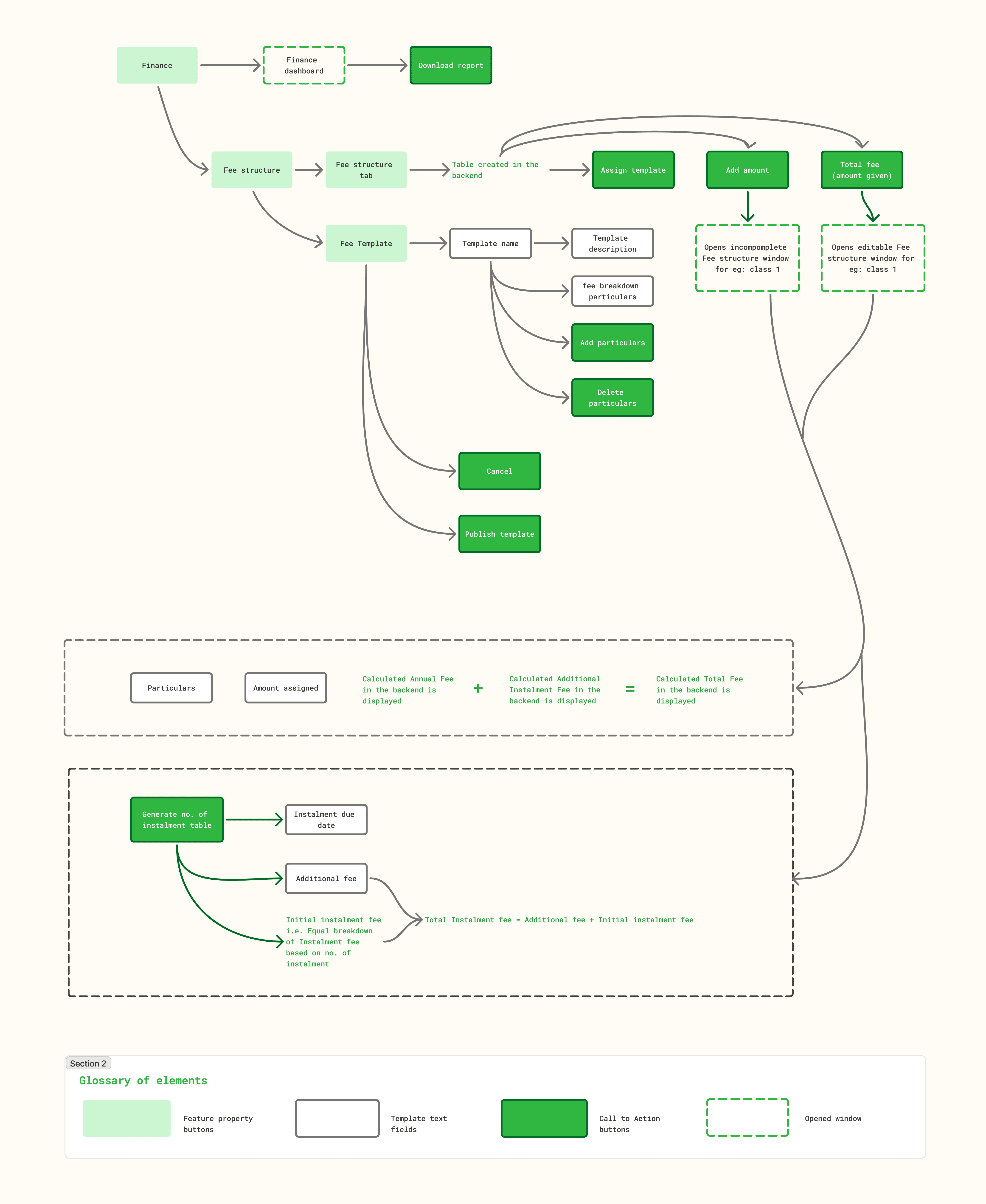
Next, the flow was mapped around how admins actually manage school finances day to day.
It starts with a high-level dashboard, moves into class-wise fee setup, and finally branches into student-specific fee records.This helped define a system that supports both standardised structures and individual payment exceptions.
Key screens
Finance dashboard across school data
It gives admins a school-wide view of fee collection and recent payment activity.
It includes six status cards - The yearly fee status showing total paid, pending, and overdue fees and the monthly fee status showing paid, pending, and overdue amounts for the selected month.
Make fee-related data easier to interpret so admins can quickly identify what needs attention and take the next right action?
Make payment tracking feel reliable, transparent, and easy to verify whenever admins need to revisit past records?
Help admins understand the overall financial health of the school at a glance, without making the information feel dense or scattered?
Reduce repeated manual work while allowing admins to create fee setups that can be reused, adjusted, and maintained over time?
Help admins handle different payment behaviours without forcing every student into the same rigid financial flow?
Design the experience to support standard fee rules while still making space for individual student-level exceptions?
THE GOAL WAS TO
To reduce repetitive manual work while giving admins the flexibility to handle exceptions at an individual student level without disrupting the larger class-level structure, while manage fee operations across both class-wise fee structures and individual student records.
How might we…


CLASS FEE STRUCTURE FLOW
STUDENT FEE STRUCTURE FLOW


Fee collection data can also be narrowed down by selecting a particular class and section.

To narrow down the data, admins can use sort filter to fill the table with 3 statuses - paid, pending and overdue

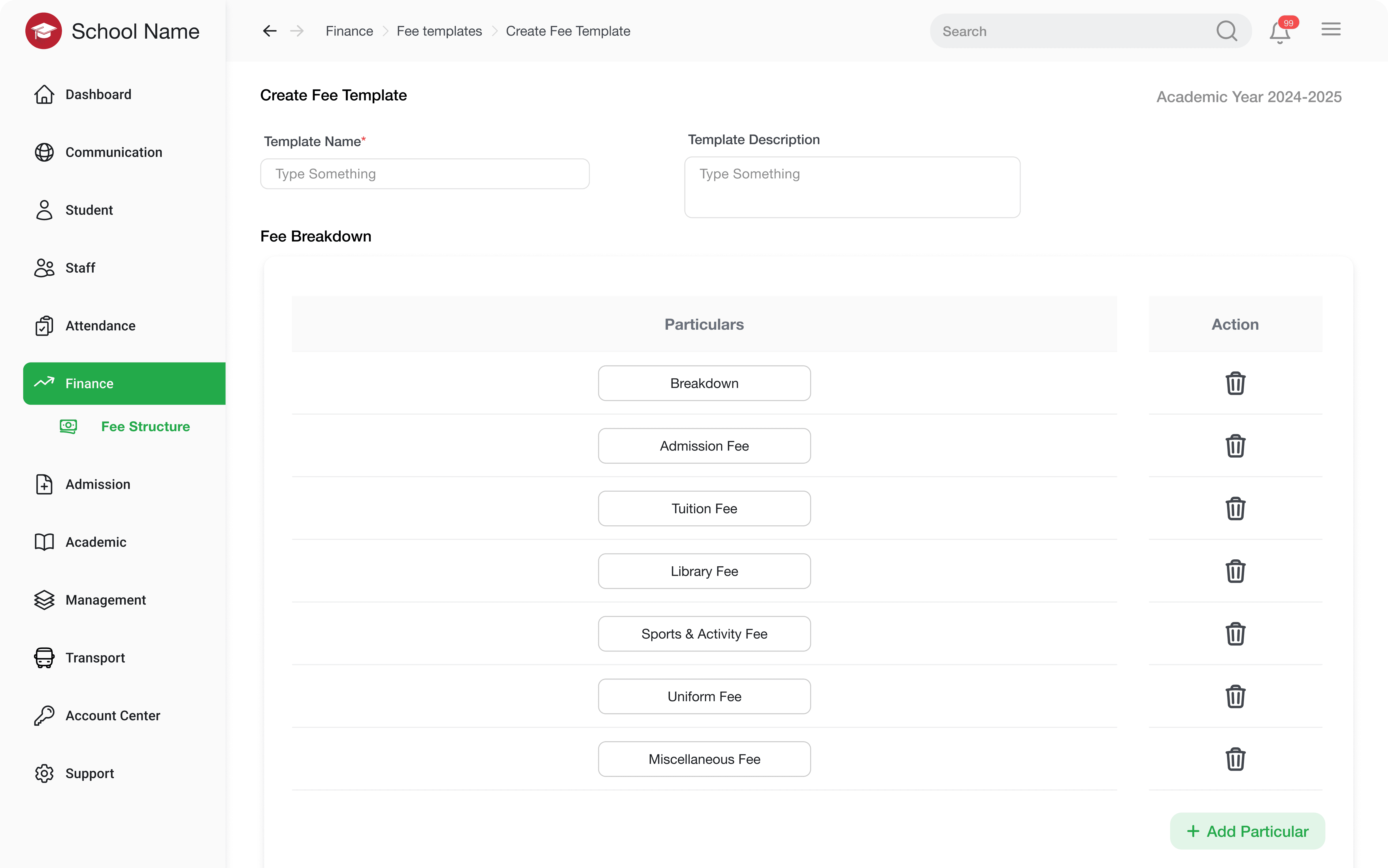
Finance breakdown template creation
Admin can fill in the details of structure they want the finance breakdown like name, description and particulars which is then later pulled up for each individual classes.

Class-wise timetable
Once assigned, the timetable applies across all class sections while still allowing edits. Admins can switch sections, add subjects, create custom periods, assign teachers, adjust timings, and preview before publishing.
This is a preview of how the timetable would look like.
Impactful design
decisions I made
Student fee records were kept editable to support real-world cases like concessions, additional fees, custom particulars, and varied payment plans.
System also supports recurring admin actions such as filtering payments, recording instalments, confirming template updates, and downloading reports or fee histories.
Reusable fee templates were introduced to reduce repeated setup and maintain consistency across classes and sections.

Fee structure for student
Admins can record an instalment payment once cleared by the student, as well as editing provision is given to adjust individual instalments for each students based on the requirements.
To sum up,
The outcome of this feature brings structure and flexibility to one of the most detail-heavy parts of school operations. By turning timetable creation into a reusable, error-aware workflow, the system supports admins in managing class schedules with more confidence and prepares the product to handle larger, more complex school setups over time.
Read case study


Scheduling exam with clarity and control
A streamlined workflow for creating, managing, and publishing exam schedules across classes and sections with fewer manual errors.
DIVING DEEP
Asking the right questions
Once again, I began by questioning what makes exam scheduling difficult for school admins beyond simply entering dates and subjects. This helped uncover the need for clarity, flexibility, conflict prevention, and progress-saving across multiple classes and sections.
From goal to a
step-by-step flow
Admins needed a way to move through different academic groups, build schedules gradually, catch issues early, and return to unfinished work without losing control. This shaped the feature into a workflow that supports planning, correction, reuse, and final review in one connected experience.
Exam scheduling across classes and its respective sections
Individual class cards gives the respective information about sections that are scheduled and are not scheduled for exams.
Key screens
Impactful design
decisions I made
Kept a flexible workflow from template setup to final assignment, allowing changes to periods, timings, subjects, teachers, and custom activities.
Prevented errors before publishing by flagging conflicts like teacher double-booking and adding a final preview step.
Reduced repetitive work by allowing admins to reuse one timetable template across multiple classes and sections.
Made navigation easier by letting admins switch between sections within the same timetable view.
To sum up,
The outcome of this feature brings structure and flexibility to one of the most detail-heavy parts of school operations. By turning timetable creation into a reusable, error-aware workflow, the system supports admins in managing class schedules with more confidence and prepares the product to handle larger, more complex school setups over time.
Give admins a clear sense of what has been planned, what is pending, and what needs attention?
Make exam scheduling feel structured enough to reduce errors, but flexible enough to support real school scenarios?
Help admins plan exams across different academic groups without making the process feel scattered or overwhelming?
Design the experience so that incomplete or incorrect information is easy to notice and act on?
surface scheduling conflicts early enough for admins to resolve them before finalising the timetable?
THE GOAL WAS TO
To turn exam scheduling into a clear, flexible workflow where admins can plan, review, and finalize timetables with fewer gaps, conflicts, and repeated effort.
How might we…

The scheduling workspace lets admins toggle between sections within a class and switch across different exam formats. Each exam tab opens with a default scheduling row, while the subject list helps track progress by automatically removing subjects once they are assigned to the timetable.
Read case study
Web - based
Mobile - based
switch tabs to read through features
A SYSTEM DESIGNED FOR ADMINS TO MANAGE ALL KINDS OF SCHOOL OPERATIONS.
Fast,
flexible Timetable assignment
Create reusable timetable with custom periods, timings, breaks, and class schedules. Assign templates to classes, add subjects and teachers, preview, and publish.
// ADMIN

Timetable template
creation
To assign a timetable, the first step is to create a reusable template. Admins start by adding basic details such as template name, description, number of periods, start time, and period duration.
Based on these inputs, a sample timetable is generated with the first day, period-wise column, timings, and available actions for editing the template.
Template assignment
table
A table created in the backend, having all classes with its respective sections and a column to assign the templates that were previously created.
Class-wise
timetable
Once assigned, the timetable applies across all class sections while still allowing edits. Admins can switch sections, add subjects, create custom periods, assign teachers, adjust timings, and preview before publishing.
This is a preview of how the timetable would look like.
Impactful design
decisions I made
Reduced repetitive work by allowing admins to reuse one timetable template across multiple classes and sections.
Kept a flexible workflow from template setup to final assignment, allowing changes to periods, timings, subjects, teachers, and custom activities.
Made navigation easier by letting admins switch between sections within the same timetable view.
Prevented errors before publishing by flagging conflicts like teacher double-booking and adding a final preview step.
To
sum up,
This feature brings structure and flexibility to one of the most detail-heavy parts of school operations. By turning timetable creation into a reusable, error-aware workflow, the system supports admins in managing class schedules with more confidence and prepares the product to handle larger, more complex school setups over time.
Help admins understand the overall financial health of the school at a glance, without making the information feel dense or scattered?
Design the experience to support standard fee rules while still making space for individual student-level exceptions?
Make fee-related data easier to interpret so admins can quickly identify what needs attention and take the next right action?
Make payment tracking feel reliable, transparent, and easy to verify whenever admins need to revisit past records?
Help admins handle different payment behaviours without forcing every student into the same rigid financial flow?
Reduce repeated manual work while allowing admins to create fee setups that can be reused, adjusted, and maintained over time?
THE GOAL WAS TO
To reduce repetitive manual work while giving admins the flexibility to handle exceptions at an individual student level without disrupting the larger class-level structure, while manage fee operations across both class-wise fee structures and individual student records.
How might we…
Configurable Fee Management system
A finance management module design that enables admins to define reusable fee structures, track collections, and handle individual student payment records seamlessly.
// ADMIN
Finance dashboard across school data
It gives admins a school-wide view of fee collection and recent payment activity.
It includes six status cards - The yearly fee status showing total paid, pending, and overdue fees and the monthly fee status showing paid, pending, and overdue amounts for the selected month.
Finance breakdown template creation
Admin can fill in the details of structure they want the finance breakdown like name, description and particulars which is then later pulled up for each individual classes.
Impactful design
decisions I made
Student fee records were kept editable to support real-world cases like concessions, additional fees, custom particulars, and varied payment plans.
System also supports recurring admin actions such as filtering payments, recording instalments, confirming template updates, and downloading reports or fee histories.
Two connected levels: class-wise fee setup and student-level fee management, allowing admins to maintain standard fee structures while handling individual exceptions when needed.
Reusable fee templates were introduced to reduce repeated setup and maintain consistency across classes and sections.
To sum up,
This feature turns fee management from a scattered administrative task into a connected, reliable workflow. The system gives admins a clearer way to manage finances while staying prepared for the many exceptions that come with real school operations.
I picked up my pen and notebook to question and what admins truly needed from a finance system.
They helped identify where the experience needed clarity, control, and room for real-world exceptions. This gave the feature a stronger direction beyond just managing fee records.
I approached with
DIVING DEEP
Asking the right questions
From goal to a
step-by-step flow
Next, the flow was mapped around how admins actually manage school finances day to day.
It starts with a high-level dashboard, moves into class-wise fee setup, and finally branches into student-specific fee records.This helped define a system that supports both standardised structures and individual payment exceptions.


To narrow down the data, admins can use sort filter to fill the table with 3 statuses - paid, pending and overdue
Fee collection data can also be narrowed down by selecting a particular class and section.
// The data shown here is directly derived from the fee structures configured for each class and section.
Fee structure for student
Admins can record an instalment payment once cleared by the student, as well as editing provision is given to adjust individual instalments for each students based on the requirements.
Now watch the feature in action!

STUDENT FEE STRUCTURE FLOW
CLASS FEE STRUCTURE FLOW
''HOW MIGHT WE''
Help admins plan exams across different academic groups without making the process feel scattered or overwhelming?
surface scheduling conflicts early enough for admins to resolve them before finalising the timetable?
Give admins a clear sense of what has been planned, what is pending, and what needs attention?
Make exam scheduling feel structured enough to reduce errors, but flexible enough to support real school scenarios?
Design the experience so that incomplete or incorrect information is easy to notice and act on?
THE GOAL WAS TO
To turn exam scheduling into a clear, flexible workflow where admins can plan, review, and finalize timetables with fewer gaps, conflicts, and repeated effort.
How might we…
Scheduling exam with clarity and control
A streamlined workflow for creating, managing, and publishing exam schedules across classes and sections with fewer manual errors.
// ADMIN
Once again, I began by questioning what makes exam scheduling difficult for school admins beyond simply entering dates and subjects. This helped uncover the need for clarity, flexibility, conflict prevention, and progress-saving across multiple classes and sections.
DIVING DEEP
Asking the right questions
From goal to a
step-by-step flow
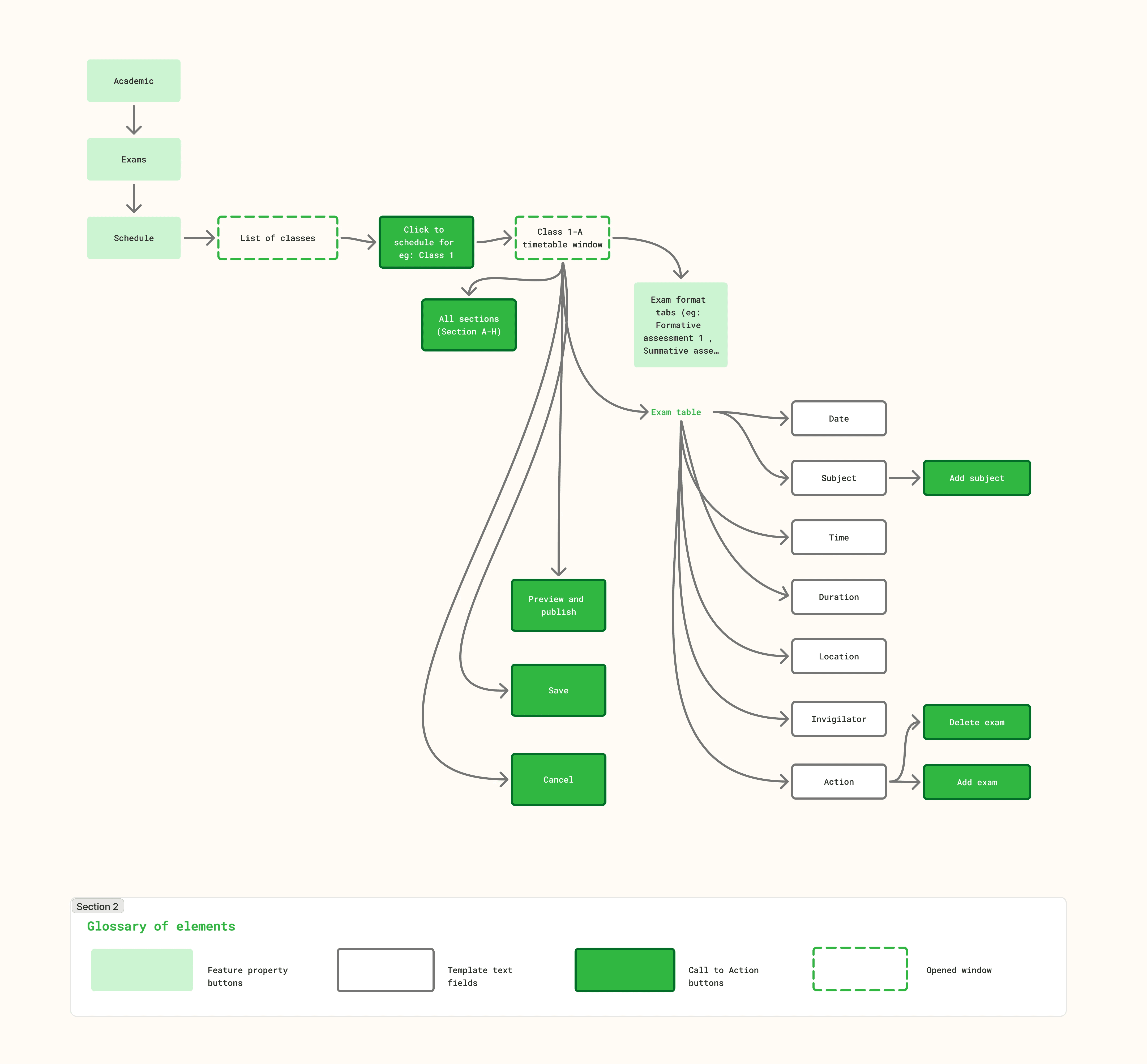
I approached the flow as a coordination journey rather than a simple scheduling task.
Admins needed a way to move through different academic groups, build schedules gradually, catch issues early, and return to unfinished work without losing control. This shaped the feature into a workflow that supports planning, correction, reuse, and final review in one connected experience.
''HOW MIGHT WE''
And, here are the

Exam scheduling across classes and its respective sections
Individual class cards gives the respective information about sections that are scheduled and are not scheduled for exams.


The scheduling workspace lets admins toggle between sections within a class and switch across different exam formats. Each exam tab opens with a default scheduling row, while the subject list helps track progress by automatically removing subjects once they are assigned to the timetable.
Impactful design
decisions I made
The system flags cases where a teacher is already assigned elsewhere during the same time slot, helping admins catch double-booking before publishing.
Protecting unsaved progress during section switching, if admins try to move away with unsaved changes, a confirmation modal appears. This prevents accidental data loss while supporting quick movement across sections.
The pending subject list helped admins track what was left, while extra rows supported real cases like multiple subjects on the same day or language-based exam splits.
Letting admins choose where duplication applies. The duplicate schedule modal uses checkboxes so admins can selectively apply a timetable only to relevant sections, instead of copying it blindly everywhere.
View other projects
View other projects


riyantika basu.
Let's talk design.
riyantikabasu@gmail.com
Crafted with love 🤍
© 2026
riyantika basu.
Let's talk design.
riyantikabasu@gmail.com
Crafted with love 🤍
© 2026
