
By this stage, the broader structure of the Internal Management App was clearly defined across five core modules:
Question bank
Coding problem bank
Master data
Company list
Requirement configuration
Among these, Requirement configuration module emerged as the highest-priority need, to be built.
Our user

On average, configuring a requirement took the internal team around 4-5 hours when sufficient bandwidth was available. During busier periods, the process could extend beyond a day due to competing operational priorities.
PRODUCT MANAGERS & DEVS
MY ROLE
Product Designer - owned the configuration flow within the Requirements module, on the larger interview management app.
THE TEAM
Product Designer - Me
Product Engineers
SKILLS
Product Thinking
UX Strategy and design
Information Architecture
UI Design
TIMELINE
2.5 Months
Began by mapping the existing process through whiteboarding, breaking down the dependencies, decision points, and gaps across the workflow. This evolved into a detailed mind map + information architecture to define flow.
Shaping of requirement configuration module
DEFINING THE DIRECTION


OTHER ITERATIONS


Making the congifuration method explicit
Expanding the selection summary with question bank health
Moving sample questions to a dedicated window and
Introducing question selection, contextual tags, and filters
Filter option let users explore questions beyond the initial set by adjusting parameters.

Q&A configuration was split into separate windows, with each screen focused on one decision. While it added more clicks, the approach helped reduce information overload and improve clarity.
Exploring a linear, step-by-step flow
Introducing a persistent stage summary
Retaining context across steps


Another approach
This section highlights the key areas that evolved across the remaining iterations, particularly how complex information was grouped, revealed, and presented in different ways.
Project overview
Geektrust is a niche tech hiring company that simplifies recruitment for software developer roles by connecting companies with pre-vetted, code-cleared candidates.
Project outcome
96%
Reduction rate of configuration time
Setup time dropped from 4–5 hours to about 10 minutes. 27x faster.
Average case. Anywhere between 5 and 30 minutes depending on configuration complexity.
SUCCESS METRICS
THAT SAID, WHAT IS GEEKTRUST?
The Internal Management App is a core part of Geektrust’s AI Hiring Ecosystem, built to help internal teams manage interview requirements. I worked on the Requirement Config experience, focusing on how teams create and configure interviews for different hiring needs.
Zero
Developer requests to set up or edit a requirement
Pulling scoring criteria, listing a company's requirements, changing a config. All of it went through a developer before.
PROBLEM STATEMENT
The existing requirement setup process was heavily manual, making it prone to errors, inconsistencies, and repeated effort. Without a clear structure, reusable patterns, or guided controls, internal teams struggled to configure interviews reliably at scale, affecting both operational efficiency and the quality of the final interview experience.

Requirement configuration is a large, multi-step module that brings together Basic Details, Q&A and Coding Stage setup, Assessment Configuration, Other Settings, and Review & Publish. Each step involved an extensive workflow of its own.
Exploration of ideations
DESIGNING THE EXPERIENCE
Initial approach
Q&A stage
ITERATION 01.
Key screens

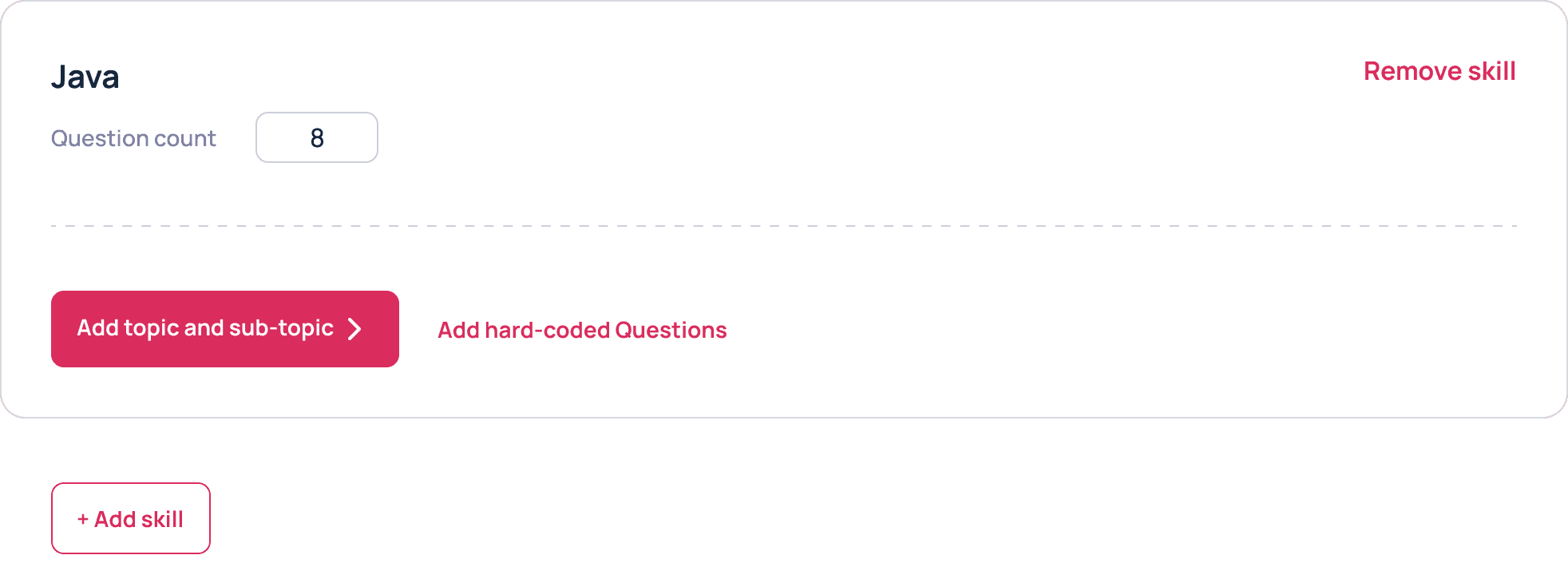
Recognising that the Q&A stage can be configured in two ways:
• By selecting existing questions from the Question Bank or
• Adding hard-coded questions manually.
A simple, single-screen setup experience was structured.


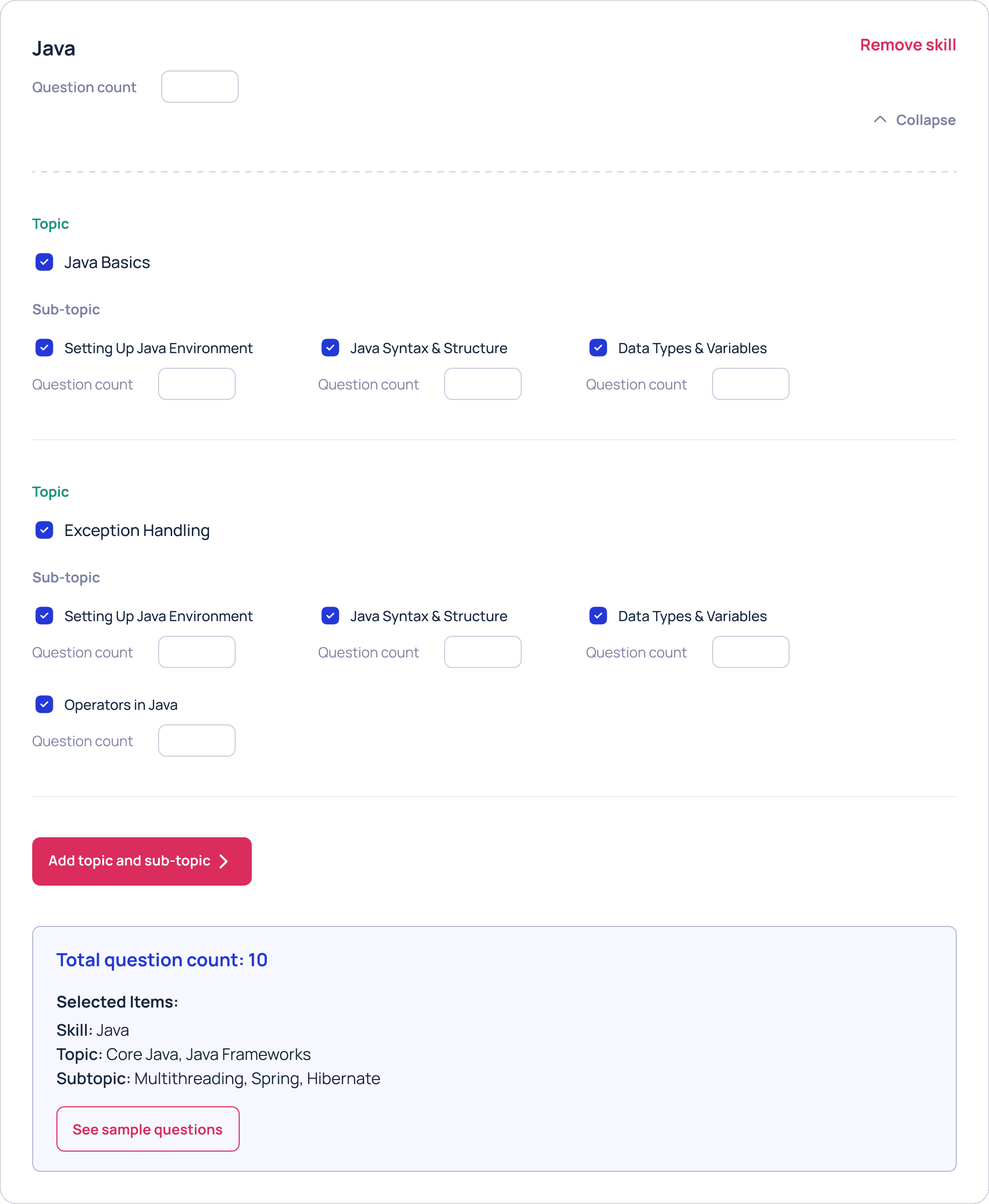
Using progressive disclosure method, each CTA reveals only the information needed for the next decision.
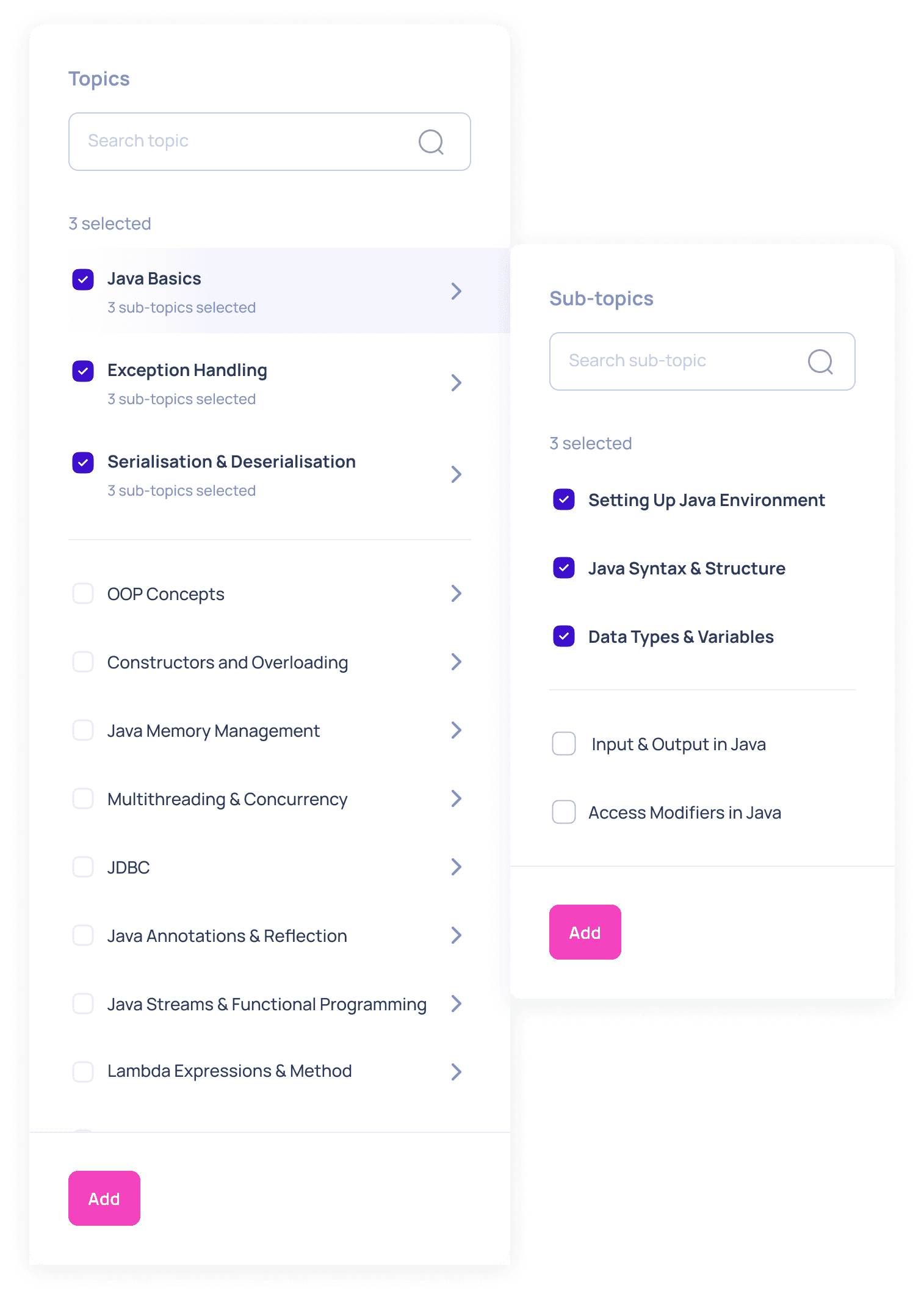
Questions can also be configured at three levels: skill, topic, or subtopic, allowing users to move from a broader concept to a more focused selection.
Skill level
Topic level
Sub-topic level

Search for and add a skill, then choose how its questions should be configured.
Summary to keep track of all selected options.
All sample questions are presented
Ability to switch to add hard-coded questions flow also exists
Internal testing and validation
After the first prototype, I tested the flow internally to see how well it supported Q&A configuration. The single-screen approach made everything visible, but it also revealed key usability issues and edge cases.
The vertical layout made it hard to track sections, review choices, and separate one skill setup from another.
Sample questions lacked visible tags, making it unclear which concept each question belonged to.
Manually distributing question counts across topics and subtopics created validation issues and edge cases.
The single-page structure became harder to use as more skills, concepts, and questions were added.
Hard-coded questions
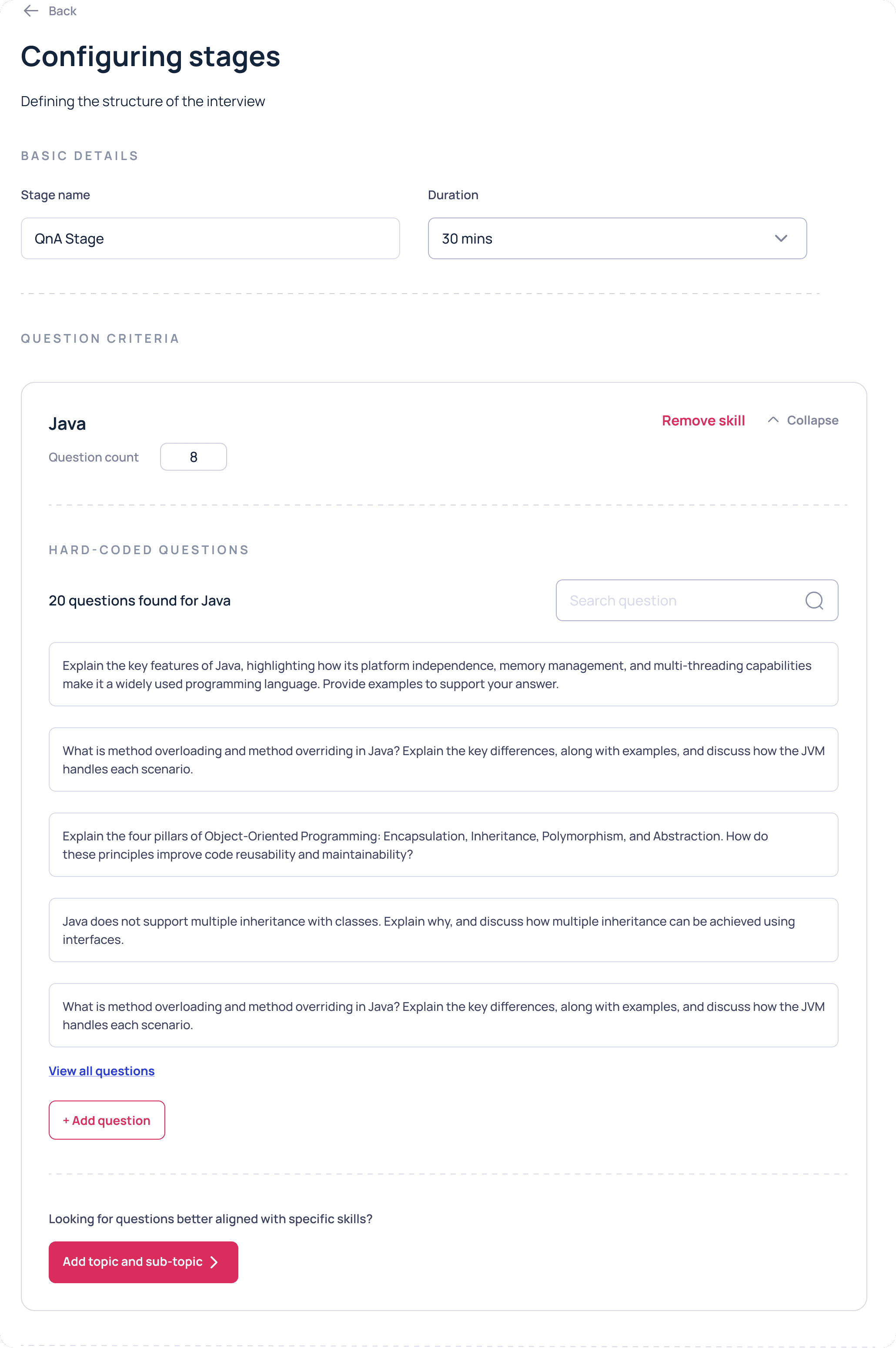
For hard-coded question configuration too, existing question in the bank is resented, incase users chose to add both manual questions and existing question to the configuration.
Review and publish
ITERATION 01.


Iterations before landing on the final designs
After numerous iterations on the requirement configuration UI, UX and countless design calls with stakeholders, it was the time for the final designs.
The Review & Publish screen brings together a concise summary of all configured stages, allowing internal teams to verify key details at a glance.
OUR GOAL WAS TO
Create a more structured and scalable way for our internal teams to configure interview requirements, replacing a manual, error-prone process with a guided experience.
How might we…
Design an internal tool that simplifies complex interview configuration while giving teams enough control to tailor requirements across different hiring needs?
Final designs
Basic information
Step 1

Basic Information is the first step in the interview setup process.
• With a left-side progress bar showing the user’s position in the overall flow.
Input mode was moved here from review & publish as default setting across all stages, while still allowing individual stages to override it when required.
Studying existing workflow, I realised the real challenge was not the complexity of interview setup, but the lack of structure around it. We translated these gaps into focused solving the main question.
Asking the right questions
DIVING DEEP
Other settings
Step 4
The Other Settings screen brings together the remaining interview-level controls

Review & publish
Step 5
The Review & Publish lets any missing or incorrect information to be edited before the requirement is published.



Now watch the feature in action!

Configure stages - Q&A Stage
Step 2
The final Q&A flow retained key logic from earlier iterations while introducing new logic and a more streamlined structure.
• Instead of displaying every configuration detail at once, the experience follows a linear, step-by-step progressive disclosure

Input mode is introduced here as well, can be overriden if required.
Q&A Stage Concepts section displays all concepts assigned to the round. Users can review and edit individually.
Once a concept and its question count is defined, users move directly to adding questions.
I shifted away from the Question Bank–first approach and prioritised hard-coded questions, as most configurations required a fresh, manually curated set.

Here is the screen flow example of the above logic: How the subtopic-level of a Skill concept configuration works.


Filters introduced for granular control over the questions.
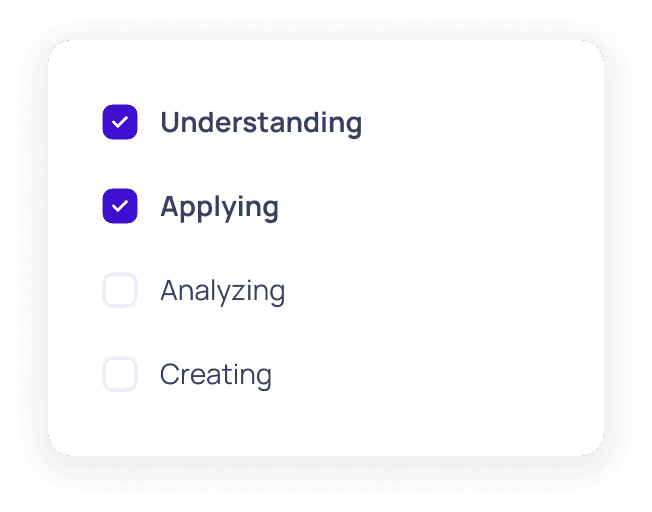
Tab based organised questions on Bloom’s cognition levels, while selected questions are collected in a dedicated tab for review.
Random question checkbox controls the order in which assigned questions appear to candidates.
Enabled - questions are presented in a different sequence for each candidate.
Disabled - every candidate receives them in exact order defined during configuration.
Selection Overview summarises total distributed questions across chosen concepts and the estimated time for each.

Adding question to bank
+ Add question
OKAY, BUT WHAT IS GEEKTRUST'S AI INTERVIEW?
Geektrust is a niche tech hiring company that simplifies recruitment for software developer roles by connecting companies with pre-vetted, code-cleared candidates.
Project outcome
SUCCESS METRICS
98%
Reduction rate of configuration time
Setup time dropped from 4–5 hours to approximately 5 minutes.
Average case. Anywhere between 5 and 30 minutes depending on configuration complexity.
0
Developer requests to set up or edit a requirement
Pulling scoring criteria, listing a company's requirements, changing a config. All of it went through a developer before.
The existing requirement setup process was heavily manual, making it prone to errors, inconsistencies, and repeated effort. Without a clear structure, reusable patterns, or guided controls, internal teams struggled to configure interviews reliably at scale, affecting both operational efficiency and the quality of the final interview experience.
PROBLEM STATEMENT
Project overview
The Internal Management App is a core part of Geektrust’s AI Hiring Ecosystem, built to help internal teams manage interview requirements. I worked on the Requirement Config experience, focusing on how teams create and configure interviews for different hiring needs.
MY ROLE
Product Designer - owned the configuration flow within the Requirements module, on the larger interview management app.
THE TEAM
Product Designer - Me
Product Engineers
SKILLS
Product Thinking
UX Strategy and design
Information Architecture
UI Design
TIMELINE
2.5 Months

Building an interview management app
Building an interview management app
As we studied the existing workflow, we realised the real challenge was not the complexity of interview setup, but the lack of structure around it. We translated these gaps into focused solving the main question, helping us define a clearer direction for the product.
DIVING DEEP
Asking the right questions
Studying existing workflow, I realised the real challenge was not the complexity of interview setup, but the lack of structure around it. We translated these gaps into focused solving the main question.
THE GOAL WAS TO
Create a more structured and scalable way for our internal teams to configure interview requirements, replacing a manual, error-prone process with a guided experience.
How might we…
Design an internal tool that simplifies complex interview configuration while giving teams enough control to tailor requirements across different hiring needs?
Our user
PRODUCT MANAGERS & DEVS
On average, configuring a requirement took the internal team around 4-5 hours when sufficient bandwidth was available. During busier periods, the process could extend beyond a day due to competing operational priorities.
By this stage, the broader structure of the Internal Management App was clearly defined across five core modules:
Requirement configuration
Question bank
Coding problem bank
Master data
Company list
Among these, Requirement configuration module emerged as the highest-priority need, to be built.
OTHER ITERATIONS
This section highlights the key areas that evolved across the remaining iterations, particularly how complex information was grouped, revealed, and presented in different ways.
Another approach
Exploring a linear, step-by-step flow
Q&A configuration was split into separate windows, with each screen focused on one decision. While it added more clicks, the approach helped reduce information overload and improve clarity.
Introducing a persistent stage summary
Retaining context across steps
Making the congifuration method explicit
Moving sample questions to a dedicated window and
Introducing question selection, contextual tags, and filters
A filter option let users explore questions beyond the initial set by adjusting topics, subtopics, complexity levels, and other parameters.
Expanding the selection summary with question bank health
Making the congifuration method explicit
Using progressive disclosure method, each CTA reveals only the information needed for the next decision.
Questions can be configured at three levels: skill, topic, or subtopic, allowing users to move from a broader concept to a more focused selection.
Review and publish
ITERATION 01.

Iterations before landing on the final designs
After numerous iterations on the requirement configuration UI, UX and countless design calls with stakeholders, it was the time for the final designs.
Final designs
Step 1
Basic information
Basic Information is the first step in the interview setup process.
With a left-side progress bar showing the user’s position in the overall flow.
Input mode was moved here from review & publish as default setting across all stages, while still allowing individual stages to override it when required.
Step 2
Configure stages - Q&A Stage
The final Q&A flow retained key logic from earlier iterations while introducing new logic and a more streamlined structure.
• Instead of displaying every configuration detail at once, the experience follows a linear, step-by-step progressive disclosure
Here is the screen flow example of the above logic: how the subtopic-level of a Skill concept configuration works.
Selection Overview summarises total distributed questions across chosen concepts and the estimated time for each.
Input mode is introduced here, can be overriden if required.
Q&A Stage Concepts section displays all concepts assigned to the round. Users can review and edit individually.
Once a concept and its question count is defined, users move directly to adding questions.
I shifted away from the Question Bank–first approach and prioritised hard-coded questions, as most configurations required a fresh, manually curated set.
Random question checkbox controls the order in which assigned questions appear to candidates.
Enabled - questions are presented in a different sequence for each candidate.
Disabled - every candidate receives them in exact order defined during configuration.
Filters introduced for granular control over the questions.
Tab based organised questions on Bloom’s cognition levels, while selected questions are collected in a dedicated tab for review.
Adding question to bank
+ Add question
Step 5
Review & publish
The Review & Publish lets any missing or incorrect information to be edited before the requirement is published.
To sum up,
This project transformed a fragmented, high-effort setup into a dependable system for building interview requirements, resulting in
54x
Faster Requirement Setup
Internal teams can now configure each requirement in a fraction of the previous time.
98%
Reduction rate of configuration time
Setup time dropped from 4–5 hours to approximately 5 minutes.
"Basically the entire thing was dependent on a dev. Now it's just one click. I don't have to wait on anyone."
Shreya Singh, Product Manager at Geektrust
Shreya Singh
Product Manager at Geektrust
Now watch the feature in action!
View other projects


DESIGNING THE EXPERIENCE
Exploration of ideations
Requirement configuration is a large, multi-step module that brings together Basic Details, Q&A and Coding Stage setup, Assessment Configuration, Other Settings, and Review & Publish. Each step involved an extensive workflow of its own.
Key screens
Initial approach
Q&A stage
ITERATION 01.
Recognising that the Q&A stage can be configured in two ways:
• By selecting existing questions from the Question Bank or
• Adding hard-coded questions manually.
A simple, single-screen setup experience was structured.
Skill level
Topic level
Sub-topic level
Using progressive disclosure method, each CTA reveals only the information needed for the next decision.
Questions can be configured at three levels: skill, topic, or subtopic, allowing users to move from a broader concept to a more focused selection.
Search for and add a skill, then choose how its questions should be configured.
Internal testing and validation
After the first prototype, I tested the flow internally to see how well it supported Q&A configuration. The single-screen approach made everything visible, but it also revealed key usability issues and edge cases.
The vertical layout made it hard to track sections, review choices, and separate one skill setup from another
Sample questions lacked visible tags, making it unclear which concept each question belonged to.
Manually distributing question counts across topics and subtopics created validation issues and edge cases.
The single-page structure became harder to use as more skills, concepts, and questions were added.
Hard-coded questions
For hard-coded question configuration too, existing question in the bank is resented, incase users chose to add both manual questions and existing question to the configuration.
We began by mapping the existing process through collaborative whiteboarding, breaking down the dependencies, decision points, and gaps across the workflow. These discussions evolved into a detailed mind map, helping us connect the different parts of the product, and eventually into an information architecture that defined how the Internal Management App would be structured and scaled.
DEFINING THE DIRECTION
Shaping of requirement configuration module
Began by mapping the existing process through collaborative whiteboarding, breaking down the dependencies, decision points, and gaps across the workflow. This evolved into a detailed mind map + information architecture to define flow.
To sum up,
Step 4
Other settings
The Other Settings screen brings together the remaining interview-level controls
View other projects
riyantika basu.
Let's talk design.
riyantikabasu@gmail.com
Crafted with love 🤍
© 2026
riyantika basu.
Let's talk design.
riyantikabasu@gmail.com
Crafted with love 🤍
© 2026
